
VLSM Subnetting for CCNA: Design of 3 LANs and 2 WAN Links
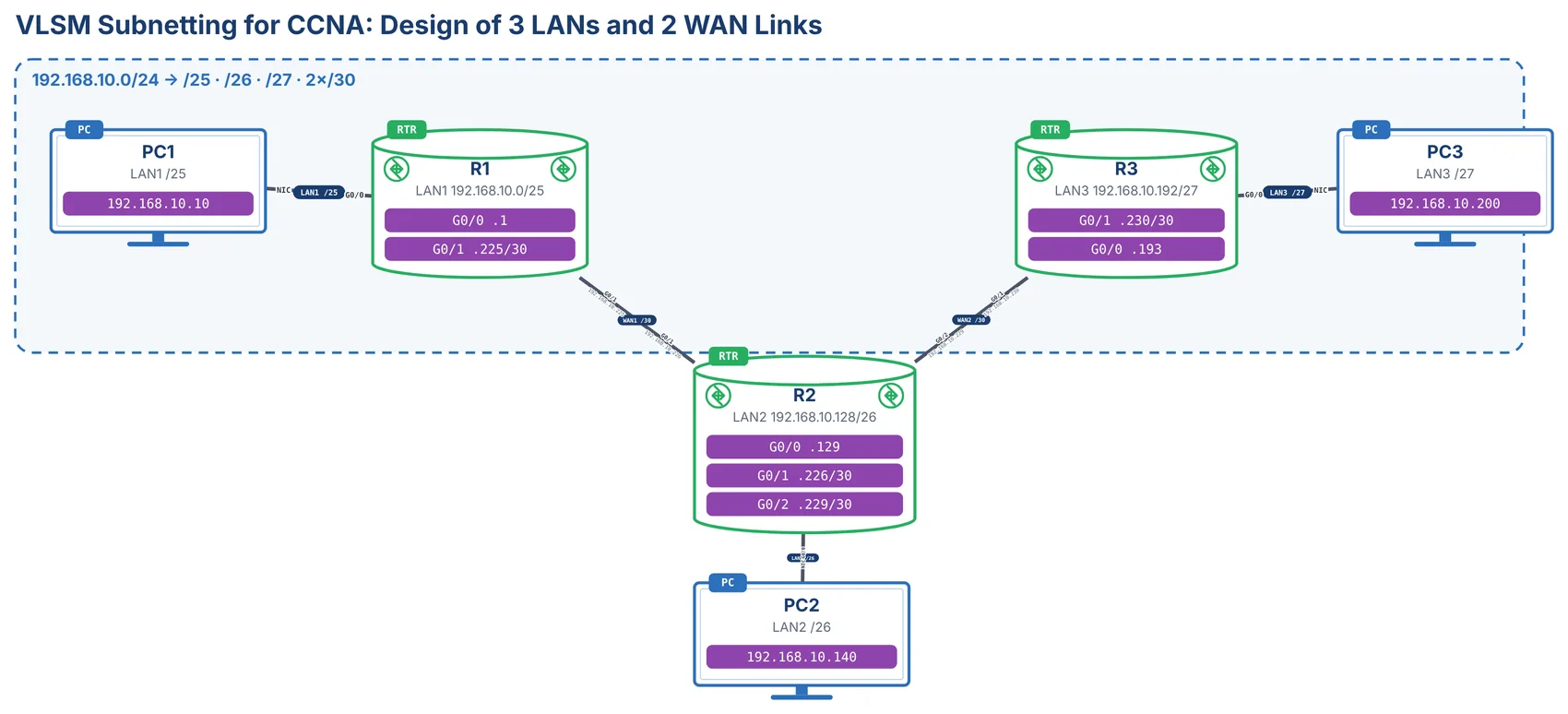
VLSM (variable-length subnet mask) lets you fit each subnet to the number of hosts it needs. This lab starts from 192.168.10.0/24 and splits it across three LANs and two WAN links without wasting addresses. It is one of the most frequent CCNA exercises.
Edit this template Download .json
Learning objectives
- Sort subnets from largest to smallest and assign them without overlap.
- Calculate network address, usable range and broadcast of each subnet.
- Verify full connectivity with static routes.
Devices and addressing
| Device | Type | Details |
|---|---|---|
| PC1 | PC / user | LAN1 /25 192.168.10.10 |
| R1 | Router | LAN1 192.168.10.0/25 G0/0 .1 G0/1 .225/30 |
| R2 | Router | LAN2 192.168.10.128/26 G0/0 .129 G0/1 .226/30 G0/2 .229/30 |
| PC2 | PC / user | LAN2 /26 192.168.10.140 |
| R3 | Router | LAN3 192.168.10.192/27 G0/1 .230/30 G0/0 .193 |
| PC3 | PC / user | LAN3 /27 192.168.10.200 |
Reference configuration (Cisco IOS)
R1
interface g0/0
 ip address 192.168.10.1 255.255.255.128
 no shutdown
interface g0/1
 ip address 192.168.10.225 255.255.255.252
 no shutdown
ip route 192.168.10.128 255.255.255.192 192.168.10.226
ip route 192.168.10.192 255.255.255.224 192.168.10.226
R2
interface g0/0
 ip address 192.168.10.129 255.255.255.192
 no shutdown
interface g0/1
 ip address 192.168.10.226 255.255.255.252
 no shutdown
interface g0/2
 ip address 192.168.10.229 255.255.255.252
 no shutdown
ip route 192.168.10.0 255.255.255.128 192.168.10.225
ip route 192.168.10.192 255.255.255.224 192.168.10.230
R3
interface g0/0
 ip address 192.168.10.193 255.255.255.224
 no shutdown
interface g0/1
 ip address 192.168.10.230 255.255.255.252
 no shutdown
ip route 0.0.0.0 0.0.0.0 192.168.10.229
Verification commands
show ip interface briefshow ip routeping 192.168.10.200 source 192.168.10.1
CCNA exam tips
Assign the largest subnet first (100 hosts → /25), then the next one, and leave the /30s for last.
Usable hosts = 2^n − 2, where n is the number of host bits.
How to use this template
Press “Edit this template”: the editor opens with the topology loaded and ready to change (undo with Ctrl+Z). You can also copy the JSON and paste it into the editor with File ▸ Import JSON…. Then add devices, change IPs and export to PDF, PNG or SVG.
To practice, rebuild the topology in Cisco Packet Tracer, GNS3 or Cisco Modeling Labs and paste the reference configuration on each device. Addresses and names are examples: change them to create your own variants.
JSON template for the editor
This is the full diagram in JSON format. Paste it into the editor (File ▸ Import JSON…) or press the edit button to load it automatically.
Frequently asked questions
What is VLSM?
Using different-length masks inside the same network to fit each subnet to its real need.
Which mask do I need for 50 hosts?
A /26 (255.255.255.192), which gives 62 usable hosts.