
Virtualization and Virtual Switch for CCNA: VMs, Hypervisor and Trunk
Virtualization lets you run several virtual machines on one physical server. The hypervisor includes a virtual switch (vSwitch) that connects to the physical switch over an 802.1Q trunk. The CCNA covers it under virtualization and the network.
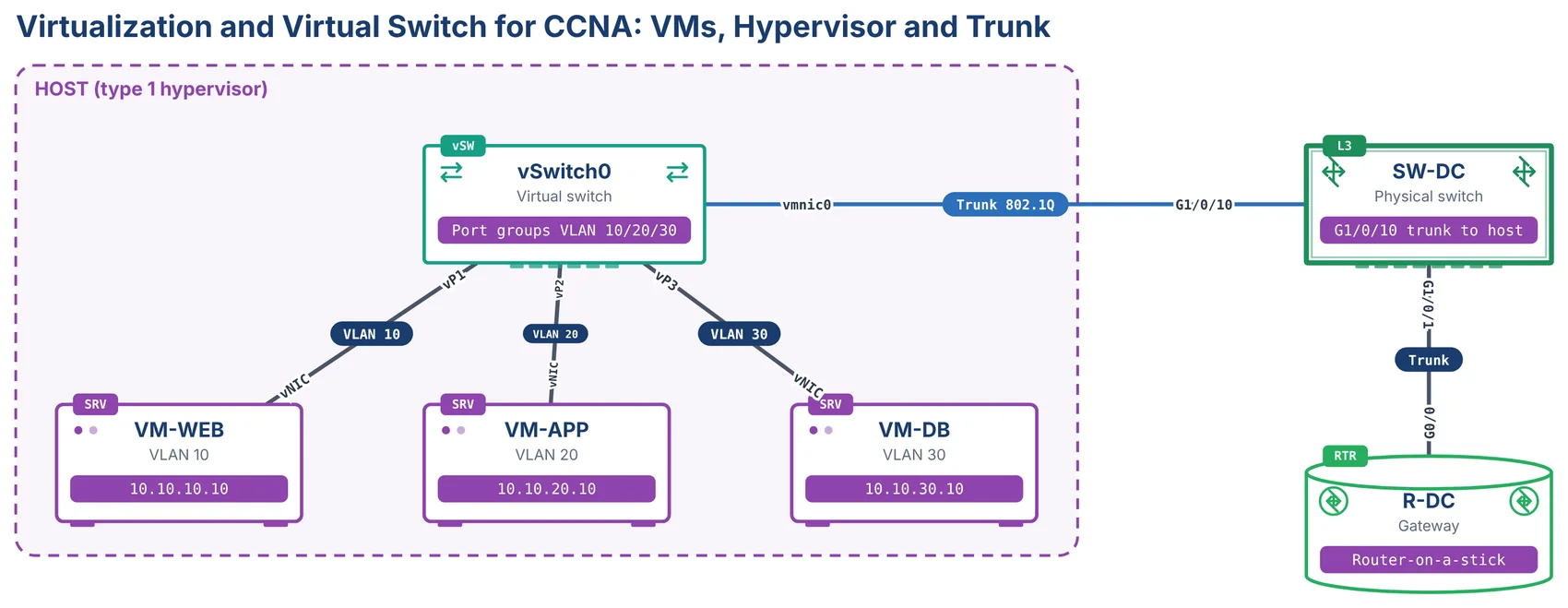
Edit this template Download .json
Learning objectives
- Tell type 1 and type 2 hypervisors apart.
- Understand the role of the vSwitch and each VM's VLAN.
- Configure the physical switch port as a trunk toward the host.
Devices and addressing
| Device | Type | Details |
|---|---|---|
| VM-WEB | Server | VLAN 10 10.10.10.10 |
| VM-APP | Server | VLAN 20 10.10.20.10 |
| VM-DB | Server | VLAN 30 10.10.30.10 |
| vSwitch0 | vSW | Virtual switch Port groups VLAN 10/20/30 |
| SW-DC | Layer 3 switch | Physical switch G1/0/10 trunk to host |
| R-DC | Router | Gateway Router-on-a-stick |
Reference configuration (Cisco IOS)
SW-DC
interface g1/0/10
 description TRUNK-HOST-ESXI
 switchport trunk encapsulation dot1q
 switchport mode trunk
 switchport trunk allowed vlan 10,20,30
 spanning-tree portfast trunk
Verification commands
show interfaces trunkshow vlan briefshow mac address-table
CCNA exam tips
Type 1 (bare-metal) runs directly on hardware; type 2 runs on a host operating system.
The physical port toward the host must be a trunk with the VMs' VLANs allowed.
How to use this template
Press “Edit this template”: the editor opens with the topology loaded and ready to change (undo with Ctrl+Z). You can also copy the JSON and paste it into the editor with File ▸ Import JSON…. Then add devices, change IPs and export to PDF, PNG or SVG.
To practice, rebuild the topology in Cisco Packet Tracer, GNS3 or Cisco Modeling Labs and paste the reference configuration on each device. Addresses and names are examples: change them to create your own variants.
JSON template for the editor
This is the full diagram in JSON format. Paste it into the editor (File ▸ Import JSON…) or press the edit button to load it automatically.
Frequently asked questions
What is a hypervisor?
Software that creates and runs virtual machines sharing the physical server's resources.
What is a vSwitch?
A software-based switch inside the hypervisor that connects VMs to each other and to the physical network.