
CCNA SOHO Network: Router, Switch and Wi-Fi with DHCP and NAT
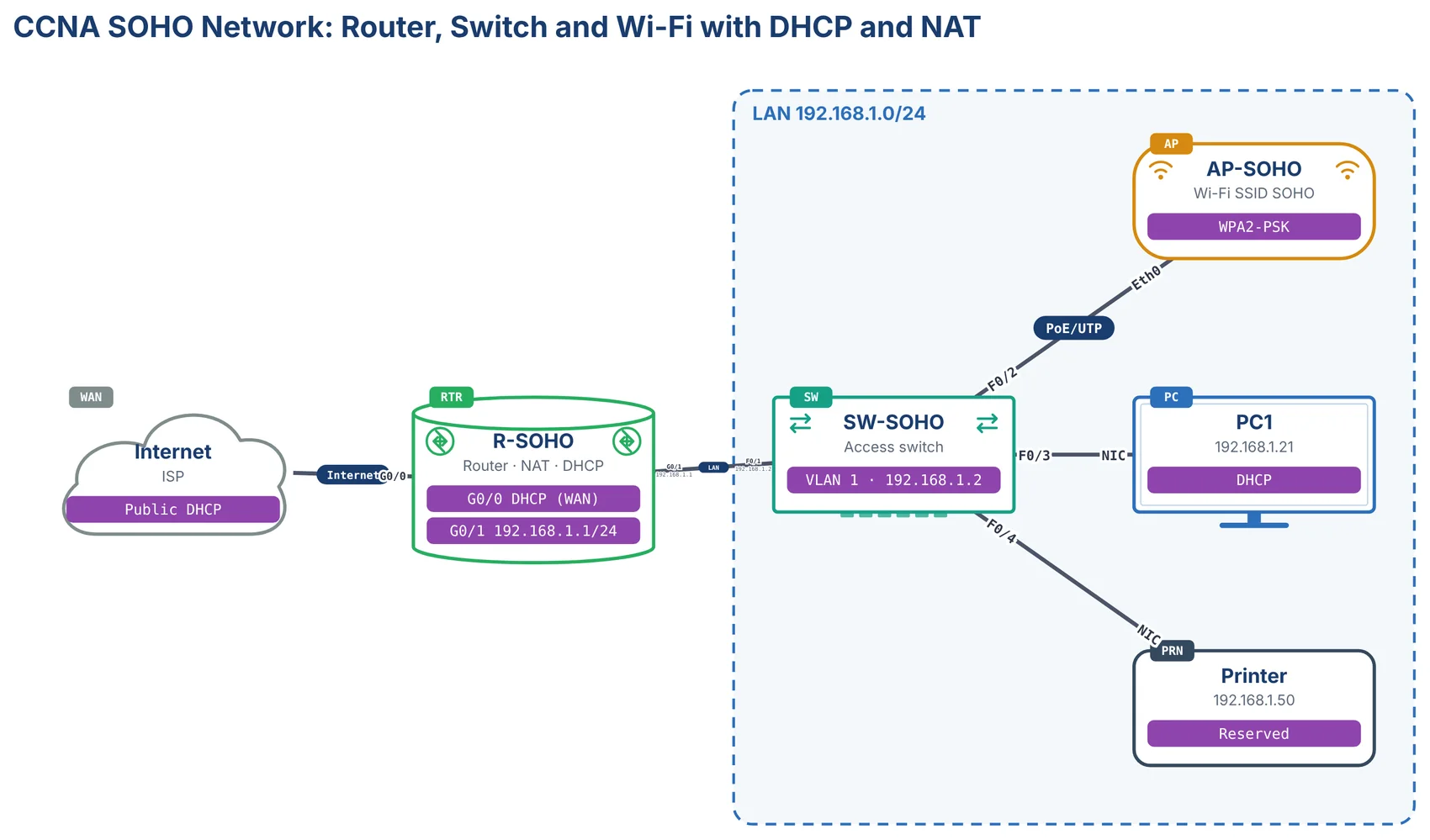
The SOHO (small office / home office) network is the simplest design on the CCNA exam: one router reaching the Internet with NAT, an access switch and a Wi-Fi access point. It lets you review device roles, DHCP and PAT in a single lab.
Edit this template Download .json
Learning objectives
- Identify the role of router, switch and access point in a small network.
- Configure a DHCP server on the router that hands out gateway and DNS.
- Share one public IP address with PAT (NAT overload).
Devices and addressing
| Device | Type | Details |
|---|---|---|
| Internet | WAN | ISP Public DHCP |
| R-SOHO | Router | Router · NAT · DHCP G0/0 DHCP (WAN) G0/1 192.168.1.1/24 |
| SW-SOHO | Switch | Access switch VLAN 1 · 192.168.1.2 |
| AP-SOHO | Access point | Wi-Fi SSID SOHO WPA2-PSK |
| PC1 | PC / user | 192.168.1.21 DHCP |
| Printer | PRN | 192.168.1.50 Reserved |
Reference configuration (Cisco IOS)
R-SOHO
hostname R-SOHO
interface g0/0
 ip address dhcp
 ip nat outside
 no shutdown
interface g0/1
 ip address 192.168.1.1 255.255.255.0
 ip nat inside
 no shutdown
ip dhcp excluded-address 192.168.1.1 192.168.1.50
ip dhcp pool LAN
 network 192.168.1.0 255.255.255.0
 default-router 192.168.1.1
 dns-server 8.8.8.8
access-list 1 permit 192.168.1.0 0.0.0.255
ip nat inside source list 1 interface g0/0 overload
Verification commands
show ip interface briefshow ip dhcp bindingshow ip nat translationsping 8.8.8.8
CCNA exam tips
In a SOHO the router is often firewall, DHCP, NAT and sometimes switch and AP at once: the exam asks about these combined roles.
Always exclude static IPs (router, printers) from the DHCP range with ip dhcp excluded-address.
How to use this template
Press “Edit this template”: the editor opens with the topology loaded and ready to change (undo with Ctrl+Z). You can also copy the JSON and paste it into the editor with File ▸ Import JSON…. Then add devices, change IPs and export to PDF, PNG or SVG.
To practice, rebuild the topology in Cisco Packet Tracer, GNS3 or Cisco Modeling Labs and paste the reference configuration on each device. Addresses and names are examples: change them to create your own variants.
JSON template for the editor
This is the full diagram in JSON format. Paste it into the editor (File ▸ Import JSON…) or press the edit button to load it automatically.
Frequently asked questions
What is a SOHO network in the CCNA?
A small office or home network with few devices, usually one router that routes, performs NAT and serves DHCP, plus a switch and an access point.
What is the difference between NAT and PAT?
NAT translates addresses; PAT (overload) maps many private IPs to one public IP, telling them apart by port.