
Point-to-Point WAN Link for CCNA: Two Sites and Static Routes
A point-to-point WAN link connects two sites with a dedicated /30 subnet. It is the foundation for understanding WAN, link addressing and static routes before moving to OSPF or VPN. It appears in CCNA WAN architecture questions.
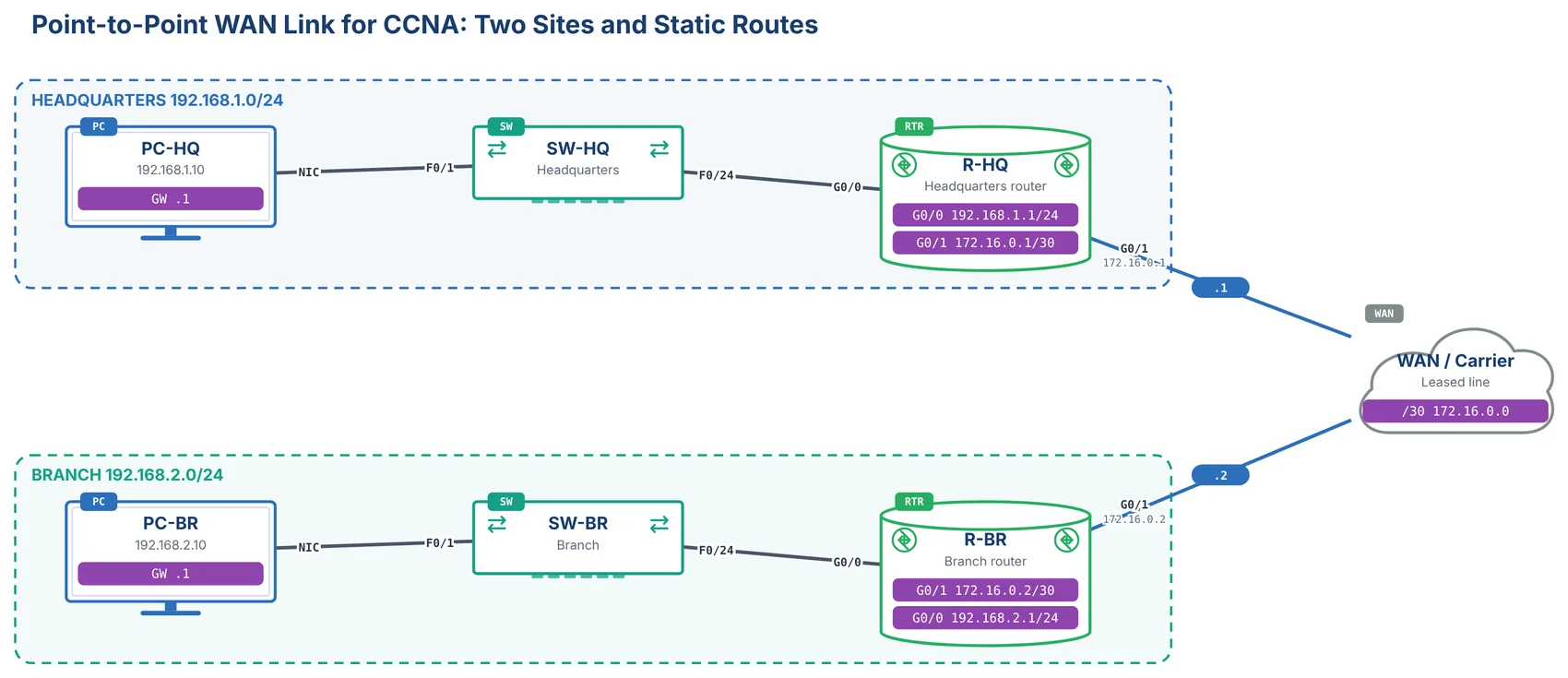
Edit this template Download .json
Learning objectives
- Calculate a /30 subnet for a two-router link.
- Configure WAN interfaces and static routes toward the remote LAN.
- Recognize WAN options: leased line, MPLS, Metro Ethernet, Internet + VPN.
Devices and addressing
| Device | Type | Details |
|---|---|---|
| PC-HQ | PC / user | 192.168.1.10 GW .1 |
| SW-HQ | Switch | Headquarters |
| R-HQ | Router | Headquarters router G0/0 192.168.1.1/24 G0/1 172.16.0.1/30 |
| WAN / Carrier | WAN | Leased line /30 172.16.0.0 |
| R-BR | Router | Branch router G0/1 172.16.0.2/30 G0/0 192.168.2.1/24 |
| SW-BR | Switch | Branch |
| PC-BR | PC / user | 192.168.2.10 GW .1 |
Reference configuration (Cisco IOS)
R-HQ
hostname R-HQ
interface g0/0
 ip address 192.168.1.1 255.255.255.0
 no shutdown
interface g0/1
 ip address 172.16.0.1 255.255.255.252
 no shutdown
ip route 192.168.2.0 255.255.255.0 172.16.0.2
R-BR
hostname R-BR
interface g0/0
 ip address 192.168.2.1 255.255.255.0
 no shutdown
interface g0/1
 ip address 172.16.0.2 255.255.255.252
 no shutdown
ip route 192.168.1.0 255.255.255.0 172.16.0.1
Verification commands
show ip interface briefshow ip route staticping 192.168.2.10traceroute 192.168.2.10
CCNA exam tips
A /30 offers 2 usable hosts, exactly what a point-to-point link needs (or a /31 with ip address ... 255.255.255.254).
If a static route uses an exit interface on Ethernet, prefer the next-hop IP.
How to use this template
Press “Edit this template”: the editor opens with the topology loaded and ready to change (undo with Ctrl+Z). You can also copy the JSON and paste it into the editor with File ▸ Import JSON…. Then add devices, change IPs and export to PDF, PNG or SVG.
To practice, rebuild the topology in Cisco Packet Tracer, GNS3 or Cisco Modeling Labs and paste the reference configuration on each device. Addresses and names are examples: change them to create your own variants.
JSON template for the editor
This is the full diagram in JSON format. Paste it into the editor (File ▸ Import JSON…) or press the edit button to load it automatically.
Frequently asked questions
Why use a /30 on the WAN link?
Because only two usable addresses are needed and few IPs are wasted.
How do I connect two sites without a routing protocol?
With static routes on each router pointing to the other site's LAN.