
IPv6 Addressing for CCNA: Global Unicast, Link-Local and SLAAC
IPv6 replaces IPv4 with 128-bit addresses. In this lab two routers connect over an IPv6 network and hosts get their address through SLAAC. It covers address types, shorthand notation and basic configuration, all mandatory CCNA topics.
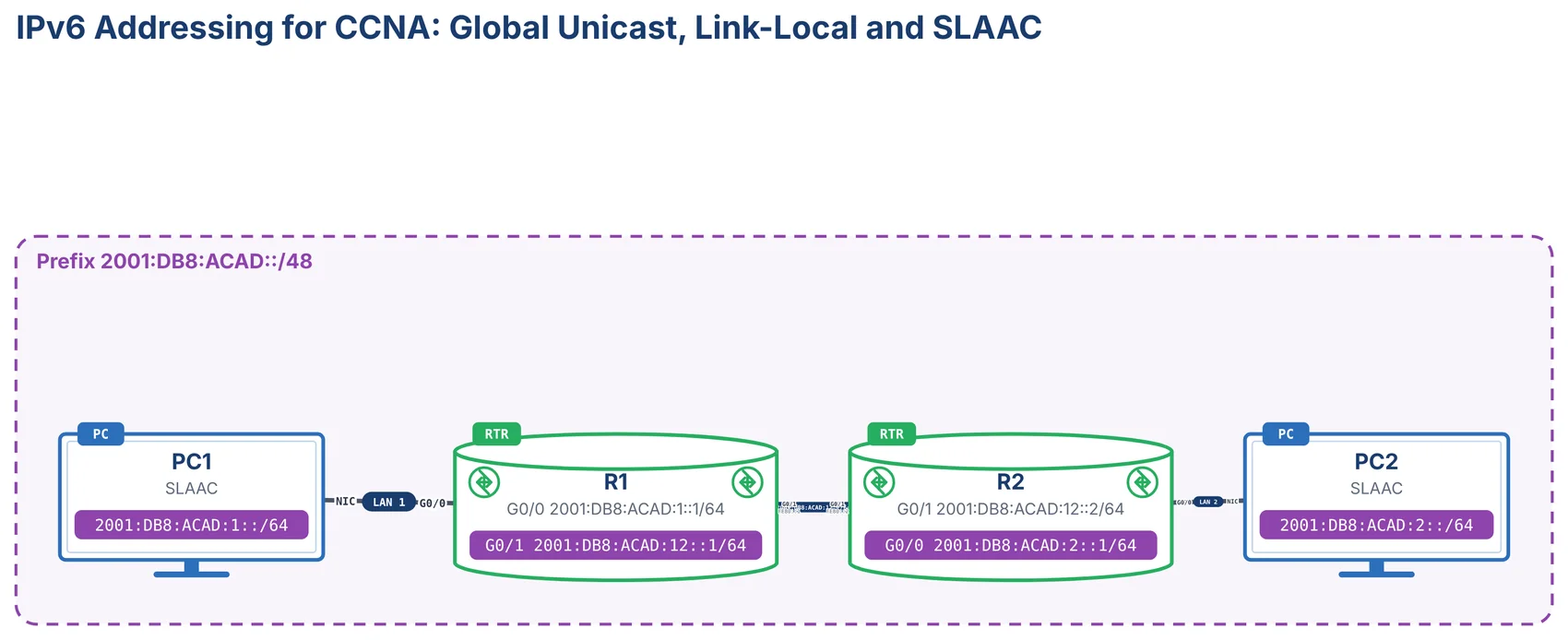
Edit this template Download .json
Learning objectives
- Write and abbreviate IPv6 addresses and recognize their types (global, link-local, multicast).
- Enable ipv6 unicast-routing and assign addresses to interfaces.
- Explain how SLAAC builds the address from the prefix and EUI-64.
Devices and addressing
| Device | Type | Details |
|---|---|---|
| PC1 | PC / user | SLAAC 2001:DB8:ACAD:1::/64 |
| R1 | Router | G0/0 2001:DB8:ACAD:1::1/64 G0/1 2001:DB8:ACAD:12::1/64 |
| R2 | Router | G0/1 2001:DB8:ACAD:12::2/64 G0/0 2001:DB8:ACAD:2::1/64 |
| PC2 | PC / user | SLAAC 2001:DB8:ACAD:2::/64 |
Reference configuration (Cisco IOS)
R1
ipv6 unicast-routing
interface g0/0
 ipv6 address 2001:db8:acad:1::1/64
 no shutdown
interface g0/1
 ipv6 address fe80::1 link-local
 ipv6 address 2001:db8:acad:12::1/64
 no shutdown
ipv6 route 2001:db8:acad:2::/64 2001:db8:acad:12::2
R2
ipv6 unicast-routing
interface g0/1
 ipv6 address fe80::2 link-local
 ipv6 address 2001:db8:acad:12::2/64
 no shutdown
interface g0/0
 ipv6 address 2001:db8:acad:2::1/64
 no shutdown
ipv6 route 2001:db8:acad:1::/64 2001:db8:acad:12::1
Verification commands
show ipv6 interface briefshow ipv6 routeping 2001:db8:acad:2::1show ipv6 neighbors
CCNA exam tips
Without ipv6 unicast-routing the router does not forward IPv6 packets or send Router Advertisements.
Link-local addresses (FE80::/10) are only valid on the link; they are the usual next hop in IPv6 static routes.
How to use this template
Press “Edit this template”: the editor opens with the topology loaded and ready to change (undo with Ctrl+Z). You can also copy the JSON and paste it into the editor with File ▸ Import JSON…. Then add devices, change IPs and export to PDF, PNG or SVG.
To practice, rebuild the topology in Cisco Packet Tracer, GNS3 or Cisco Modeling Labs and paste the reference configuration on each device. Addresses and names are examples: change them to create your own variants.
JSON template for the editor
This is the full diagram in JSON format. Paste it into the editor (File ▸ Import JSON…) or press the edit button to load it automatically.
Frequently asked questions
What is SLAAC?
Stateless address autoconfiguration: the host builds its address from the prefix advertised by the router and an interface identifier.
How many bits is an IPv6 address?
128 bits, written as eight 16-bit hexadecimal blocks.