
Straight-Through, Crossover and Console Cables: CCNA Guide
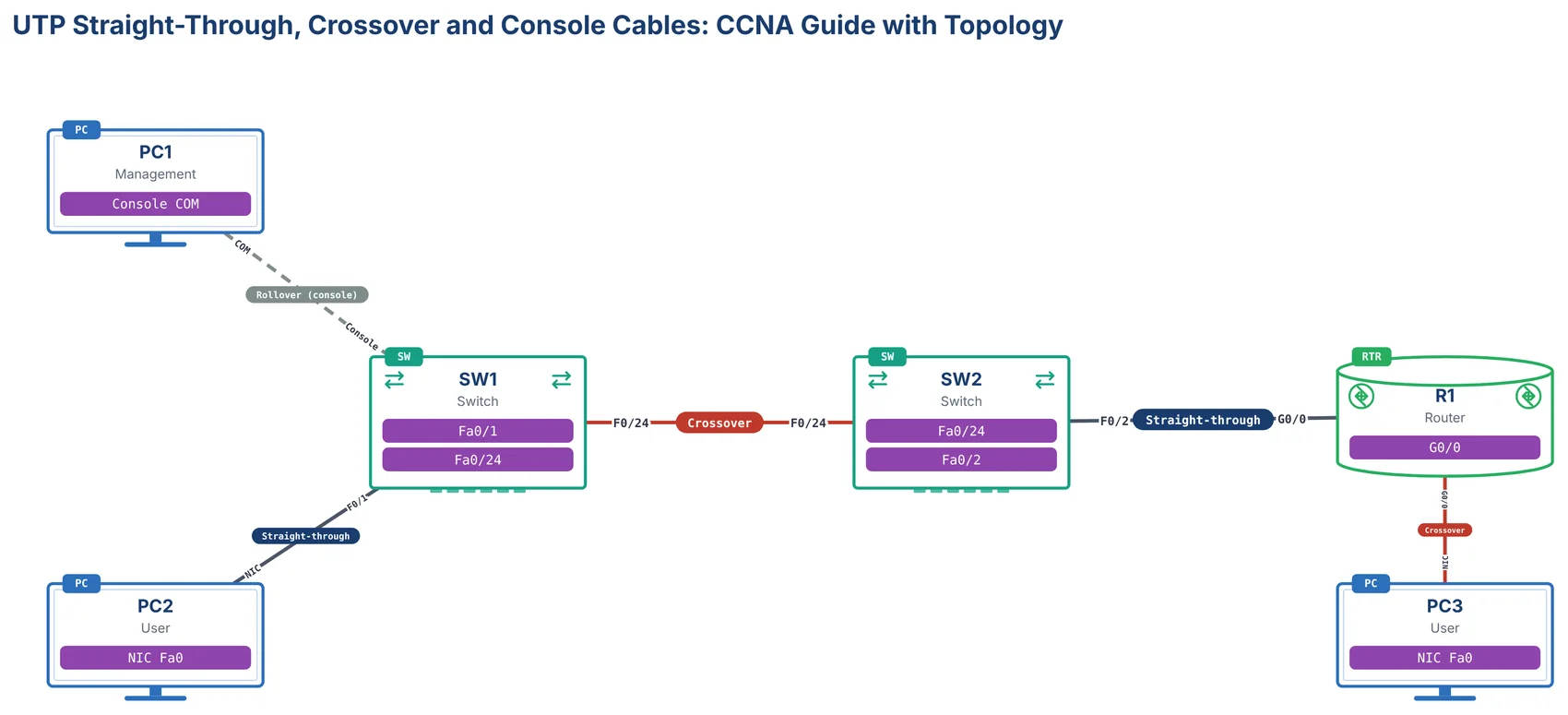
Choosing the right cable is a classic CCNA question: straight-through between devices of different layers (PC–switch, router–switch) and crossover between like devices (switch–switch, PC–router). Most ports now use Auto-MDIX, but the exam still asks about it.
Edit this template Download .json
Learning objectives
- Decide between straight-through, crossover and console cables based on both ends.
- Tell transmit and receive pairs apart (MDI and MDI-X).
- Detect and fix a duplex or speed mismatch.
Devices and addressing
| Device | Type | Details |
|---|---|---|
| PC1 | PC / user | Management Console COM |
| SW1 | Switch | Switch Fa0/1 Fa0/24 |
| SW2 | Switch | Switch Fa0/24 Fa0/2 |
| R1 | Router | Router G0/0 |
| PC2 | PC / user | User NIC Fa0 |
| PC3 | PC / user | User NIC Fa0 |
Reference configuration (Cisco IOS)
SW1
interface f0/24
 speed 100
 duplex full
 mdix auto
 no shutdown
Verification commands
show interfaces statusshow interfaces f0/24show running-config interface f0/24
CCNA exam tips
Rule: different devices → straight-through; like devices → crossover (PC–router and PC–PC count as "like").
With Auto-MDIX enabled the crossover cable is no longer needed on most modern interfaces.
How to use this template
Press “Edit this template”: the editor opens with the topology loaded and ready to change (undo with Ctrl+Z). You can also copy the JSON and paste it into the editor with File ▸ Import JSON…. Then add devices, change IPs and export to PDF, PNG or SVG.
To practice, rebuild the topology in Cisco Packet Tracer, GNS3 or Cisco Modeling Labs and paste the reference configuration on each device. Addresses and names are examples: change them to create your own variants.
JSON template for the editor
This is the full diagram in JSON format. Paste it into the editor (File ▸ Import JSON…) or press the edit button to load it automatically.
Frequently asked questions
When do I use a crossover cable?
Between devices of the same kind: switch to switch, router to router, PC to router.
What is the console cable for?
Local management of the device through the console port, using a USB/RJ-45 adapter and a terminal emulator.