
Autonomous AP for CCNA: Simple Wi-Fi with SSID, VLAN and WPA2
An autonomous AP works on its own: it is configured individually (SSID, security, channel and VLAN) and plugs into a switch port. It is the option for small sites and the starting point to compare with controller-based architectures.
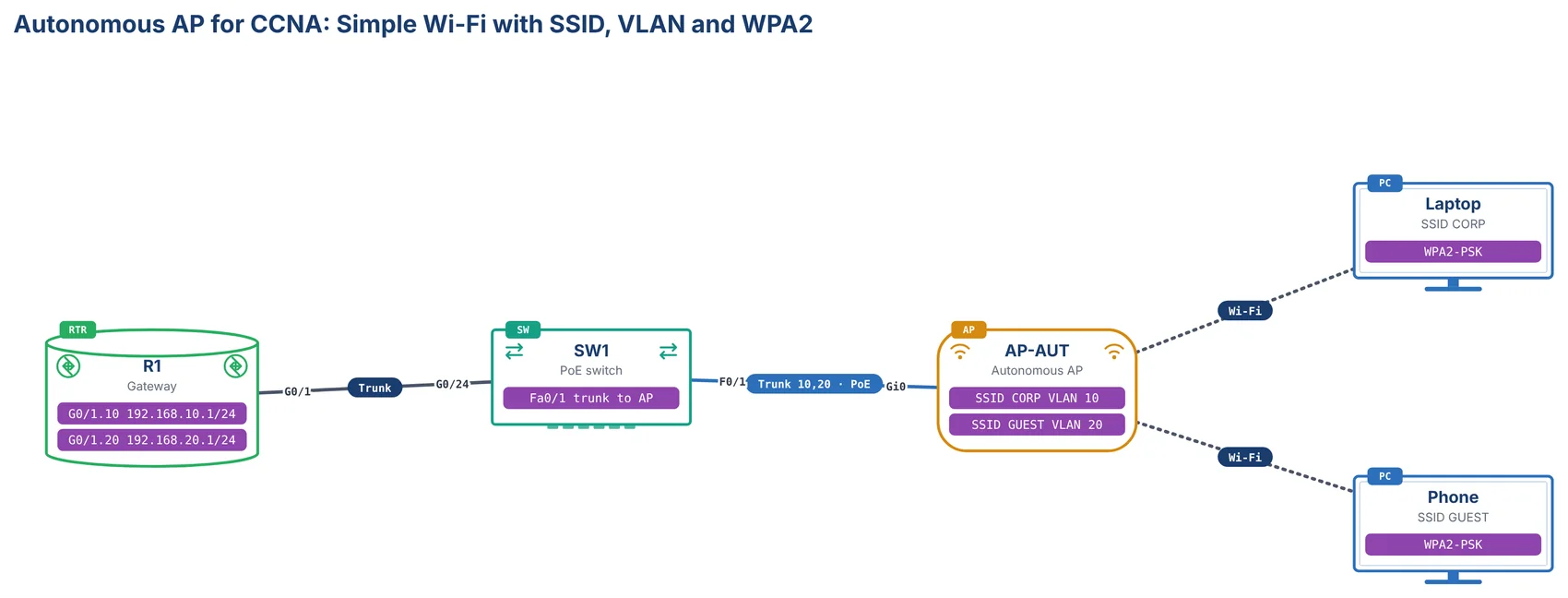
Edit this template Download .json
Learning objectives
- Configure SSID, WPA2-PSK security and VLAN on an autonomous AP.
- Connect the AP to an access or trunk port depending on the VLANs.
- Compare the autonomous AP with the lightweight AP and the cloud AP.
Devices and addressing
| Device | Type | Details |
|---|---|---|
| R1 | Router | Gateway G0/1.10 192.168.10.1/24 G0/1.20 192.168.20.1/24 |
| SW1 | Switch | PoE switch Fa0/1 trunk to AP |
| AP-AUT | AP | Autonomous AP SSID CORP VLAN 10 SSID GUEST VLAN 20 |
| Laptop | PC / user | SSID CORP WPA2-PSK |
| Phone | PC / user | SSID GUEST WPA2-PSK |
Reference configuration (Cisco IOS)
SW1
interface f0/1
 description AP-AUTONOMO
 switchport trunk encapsulation dot1q
 switchport mode trunk
 switchport trunk native vlan 10
 switchport trunk allowed vlan 10,20
 power inline auto
AP-AUT (IOS)
dot11 ssid CORP
 vlan 10
 authentication open
 authentication key-management wpa version 2
 wpa-psk ascii Clave-Corp-2026
dot11 ssid GUEST
 vlan 20
 authentication open
 authentication key-management wpa version 2
 wpa-psk ascii Clave-Guest-2026
interface dot11radio0
 encryption vlan 10 mode ciphers aes-ccm
 encryption vlan 20 mode ciphers aes-ccm
 ssid CORP
 ssid GUEST
 no shutdown
Verification commands
show dot11 associationsshow interfaces trunkshow vlan brief
CCNA exam tips
An autonomous AP with several SSIDs/VLANs needs a trunk port; with one SSID an access port is enough.
Use non-overlapping channels on 2.4 GHz: 1, 6 and 11.
How to use this template
Press “Edit this template”: the editor opens with the topology loaded and ready to change (undo with Ctrl+Z). You can also copy the JSON and paste it into the editor with File ▸ Import JSON…. Then add devices, change IPs and export to PDF, PNG or SVG.
To practice, rebuild the topology in Cisco Packet Tracer, GNS3 or Cisco Modeling Labs and paste the reference configuration on each device. Addresses and names are examples: change them to create your own variants.
JSON template for the editor
This is the full diagram in JSON format. Paste it into the editor (File ▸ Import JSON…) or press the edit button to load it automatically.
Frequently asked questions
When is an autonomous AP a good choice?
In small networks with few APs, where configuring each one is manageable.
What is an SSID?
The name of the Wi-Fi network that clients see.