
CDP and LLDP for CCNA: Layer 2 Neighbor Discovery
CDP (Cisco-proprietary) and LLDP (IEEE 802.1AB standard) advertise each device's information to its directly connected neighbors. They let you map the real topology without documentation, hence they are a Network Access topic in the CCNA.
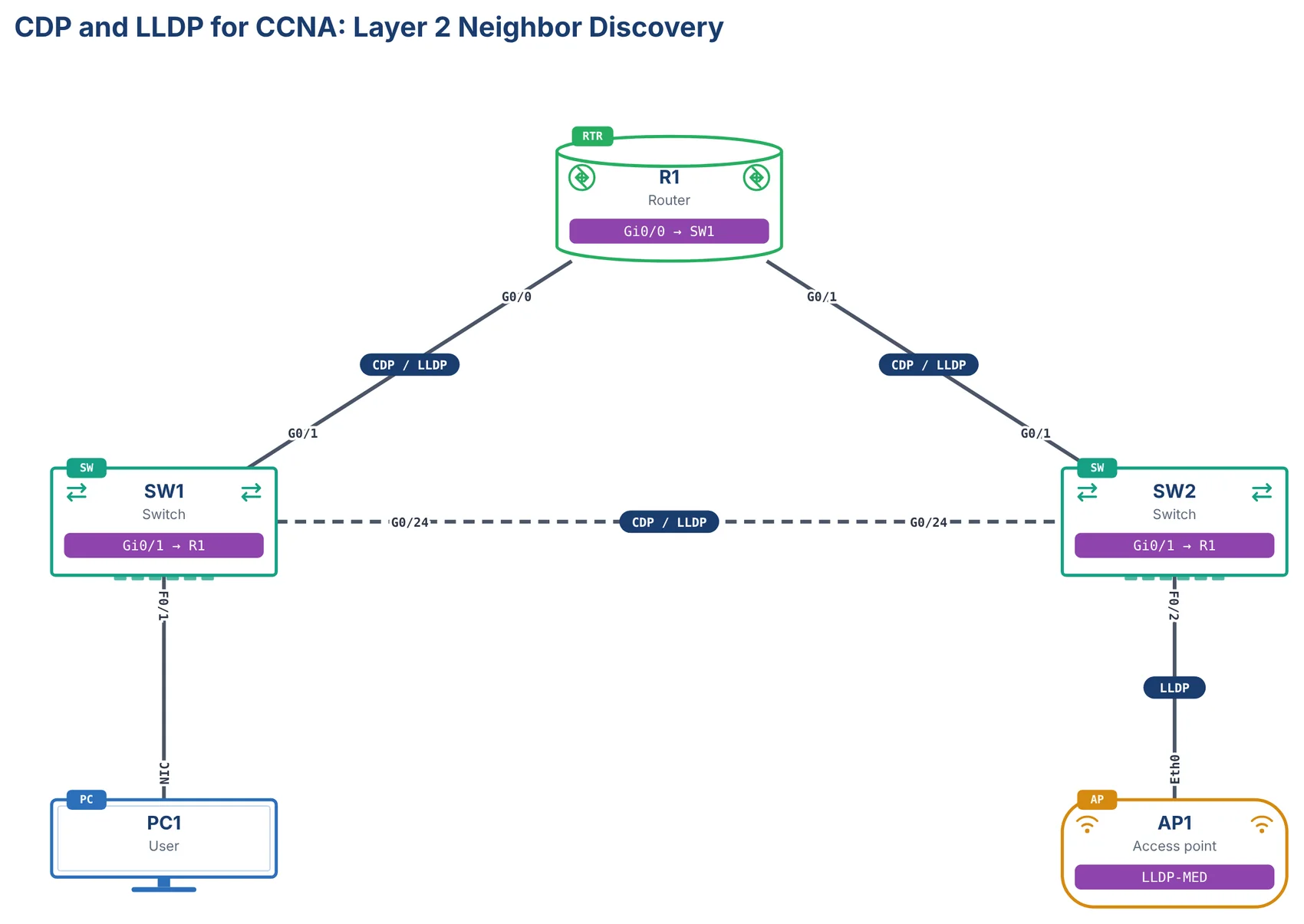
Edit this template Download .json
Learning objectives
- Verify neighbors with show cdp neighbors and show lldp neighbors.
- Enable LLDP and disable CDP on interfaces that do not need it.
- Explain what data each protocol advertises.
Devices and addressing
| Device | Type | Details |
|---|---|---|
| R1 | Router | Router Gi0/0 → SW1 |
| SW1 | Switch | Switch Gi0/1 → R1 |
| SW2 | Switch | Switch Gi0/1 → R1 |
| AP1 | Access point | Access point LLDP-MED |
| PC1 | PC / user | User |
Reference configuration (Cisco IOS)
SW1
cdp run
lldp run
interface g0/1
 cdp enable
 lldp transmit
 lldp receive
interface f0/1
 no cdp enable
 no lldp transmit
 no lldp receive
Verification commands
show cdp neighbors detailshow lldp neighborsshow cdp interfaceshow lldp interface
CCNA exam tips
CDP is on by default on Cisco devices; LLDP is off until you run lldp run.
Disable CDP/LLDP on outward-facing ports: it reveals model, IOS and addresses.
How to use this template
Press “Edit this template”: the editor opens with the topology loaded and ready to change (undo with Ctrl+Z). You can also copy the JSON and paste it into the editor with File ▸ Import JSON…. Then add devices, change IPs and export to PDF, PNG or SVG.
To practice, rebuild the topology in Cisco Packet Tracer, GNS3 or Cisco Modeling Labs and paste the reference configuration on each device. Addresses and names are examples: change them to create your own variants.
JSON template for the editor
This is the full diagram in JSON format. Paste it into the editor (File ▸ Import JSON…) or press the edit button to load it automatically.
Frequently asked questions
What is the difference between CDP and LLDP?
CDP is Cisco-only while LLDP is an open standard that works with other vendors.
Does CDP cross a router?
No: it works at layer 2 and only sees directly connected neighbors.