
VLAN and 802.1Q Trunk for CCNA: Step-by-Step Configuration
VLANs split one switch into several logical networks and 802.1Q trunks carry multiple VLANs over a single link. This is the base lab of the Network Access domain: two switches, three VLANs and a trunk that connects them.
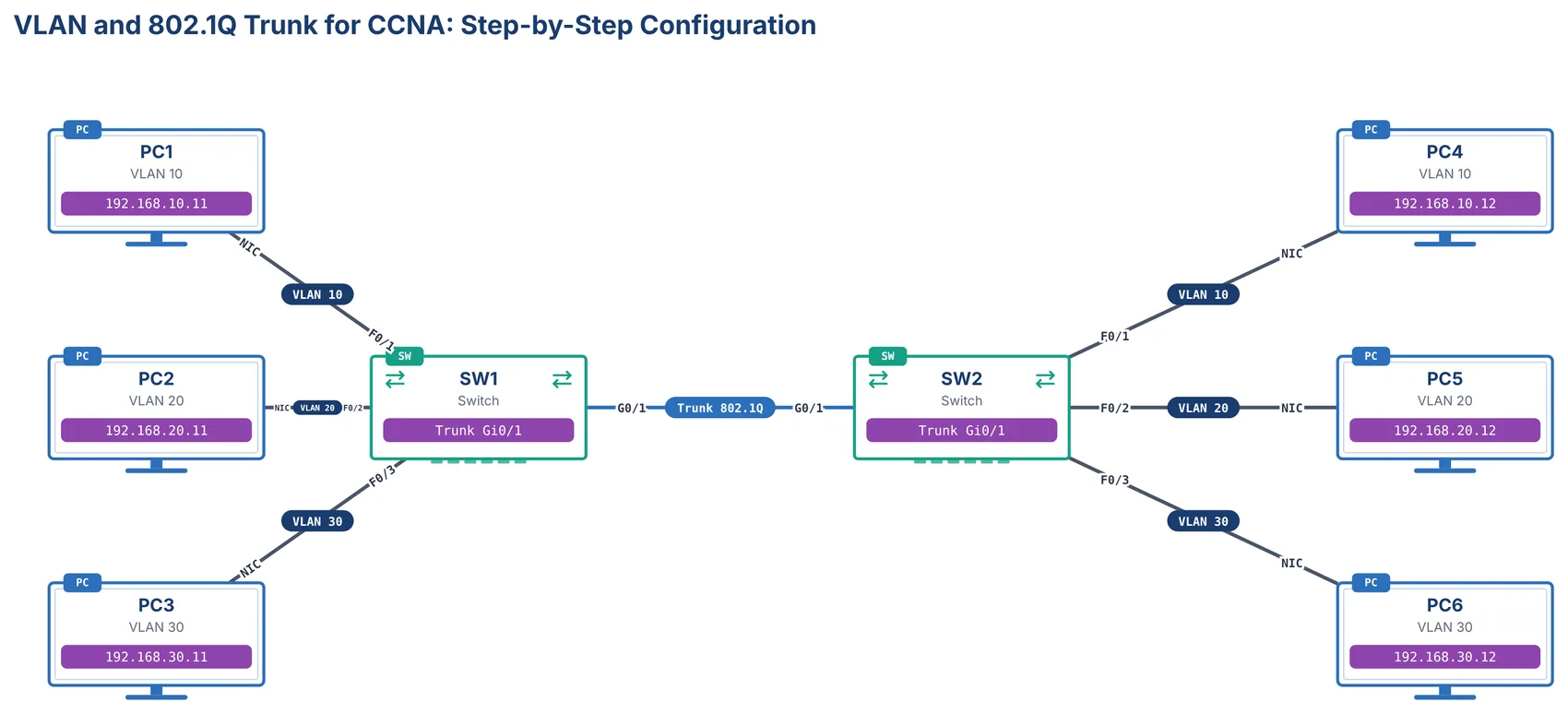
Edit this template Download .json
Learning objectives
- Create VLANs and assign access ports.
- Configure an 802.1Q trunk with allowed VLANs and native VLAN.
- Verify VLANs, trunks and connectivity between hosts in the same VLAN.
Devices and addressing
| Device | Type | Details |
|---|---|---|
| PC1 | PC / user | VLAN 10 192.168.10.11 |
| PC2 | PC / user | VLAN 20 192.168.20.11 |
| PC3 | PC / user | VLAN 30 192.168.30.11 |
| SW1 | Switch | Switch Trunk Gi0/1 |
| SW2 | Switch | Switch Trunk Gi0/1 |
| PC4 | PC / user | VLAN 10 192.168.10.12 |
| PC5 | PC / user | VLAN 20 192.168.20.12 |
| PC6 | PC / user | VLAN 30 192.168.30.12 |
Reference configuration (Cisco IOS)
SW1 (igual en SW2)
vlan 10
 name VENTAS
vlan 20
 name TI
vlan 30
 name INVITADOS
vlan 99
 name NATIVA
interface f0/1
 switchport mode access
 switchport access vlan 10
interface f0/2
 switchport mode access
 switchport access vlan 20
interface f0/3
 switchport mode access
 switchport access vlan 30
interface g0/1
 switchport mode trunk
 switchport trunk native vlan 99
 switchport trunk allowed vlan 10,20,30,99
Verification commands
show vlan briefshow interfaces trunkshow interfaces g0/1 switchportping 192.168.10.12
CCNA exam tips
The native VLAN travels untagged and must match on both ends; change it from VLAN 1 for security.
Hosts in different VLANs cannot talk without a layer 3 device.
How to use this template
Press “Edit this template”: the editor opens with the topology loaded and ready to change (undo with Ctrl+Z). You can also copy the JSON and paste it into the editor with File ▸ Import JSON…. Then add devices, change IPs and export to PDF, PNG or SVG.
To practice, rebuild the topology in Cisco Packet Tracer, GNS3 or Cisco Modeling Labs and paste the reference configuration on each device. Addresses and names are examples: change them to create your own variants.
JSON template for the editor
This is the full diagram in JSON format. Paste it into the editor (File ▸ Import JSON…) or press the edit button to load it automatically.
Frequently asked questions
What does an 802.1Q trunk do?
It carries traffic of several VLANs over one link by adding a 4-byte tag to each frame (except the native VLAN).
Why can't two PCs in different VLANs communicate?
Because they are separate broadcast domains; a router or layer 3 switch is required.