
Spanning Tree (RSTP/Rapid PVST+) for CCNA: Root Bridge and Port Roles
Redundant links between switches create layer 2 loops. Spanning Tree blocks the extra paths and leaves a loop-free topology. Rapid PVST+ converges in seconds and is the version you must master for the CCNA.
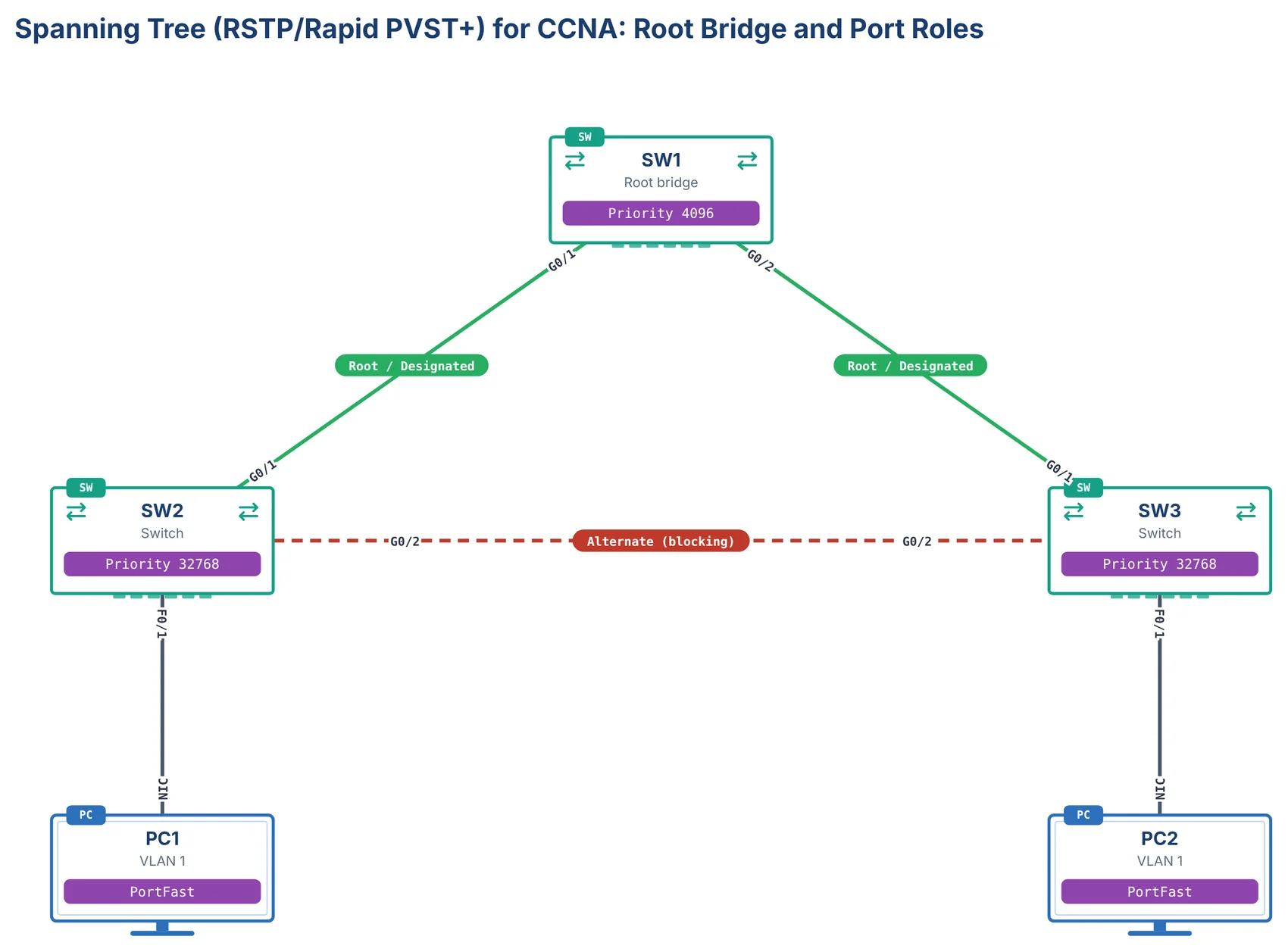
Edit this template Download .json
Learning objectives
- Identify the root bridge and port roles (root, designated, alternate).
- Force the root bridge with priority and enable Rapid PVST+.
- Protect access ports with PortFast and BPDU Guard.
Devices and addressing
| Device | Type | Details |
|---|---|---|
| SW1 | Switch | Root bridge Priority 4096 |
| SW2 | Switch | Switch Priority 32768 |
| SW3 | Switch | Switch Priority 32768 |
| PC1 | PC / user | VLAN 1 PortFast |
| PC2 | PC / user | VLAN 1 PortFast |
Reference configuration (Cisco IOS)
SW1 (raíz)
spanning-tree mode rapid-pvst
spanning-tree vlan 1 priority 4096
SW2 / SW3
spanning-tree mode rapid-pvst
interface f0/1
 switchport mode access
 spanning-tree portfast
 spanning-tree bpduguard enable
Verification commands
show spanning-treeshow spanning-tree summaryshow spanning-tree vlan 1 detail
CCNA exam tips
Root bridge election uses the lowest priority and, on a tie, the lowest MAC.
In the triangle there is always one blocked (alternate) port on a non-root switch.
How to use this template
Press “Edit this template”: the editor opens with the topology loaded and ready to change (undo with Ctrl+Z). You can also copy the JSON and paste it into the editor with File ▸ Import JSON…. Then add devices, change IPs and export to PDF, PNG or SVG.
To practice, rebuild the topology in Cisco Packet Tracer, GNS3 or Cisco Modeling Labs and paste the reference configuration on each device. Addresses and names are examples: change them to create your own variants.
JSON template for the editor
This is the full diagram in JSON format. Paste it into the editor (File ▸ Import JSON…) or press the edit button to load it automatically.
Frequently asked questions
How is the root bridge elected?
The switch with the lowest bridge ID wins: priority (multiples of 4096 + VLAN) and, on a tie, the lowest MAC address.
What is PortFast for?
It puts an access port into forwarding immediately; it is combined with BPDU Guard to prevent loops.