
IPv4 Static Routes for CCNA: Three Routers and Two LANs
Static routes are written by hand and do not change on their own. They are simple, predictable and use no CPU, so they fit small networks or edges. This lab connects two LANs through an intermediate router and is the basic IP Connectivity exercise.
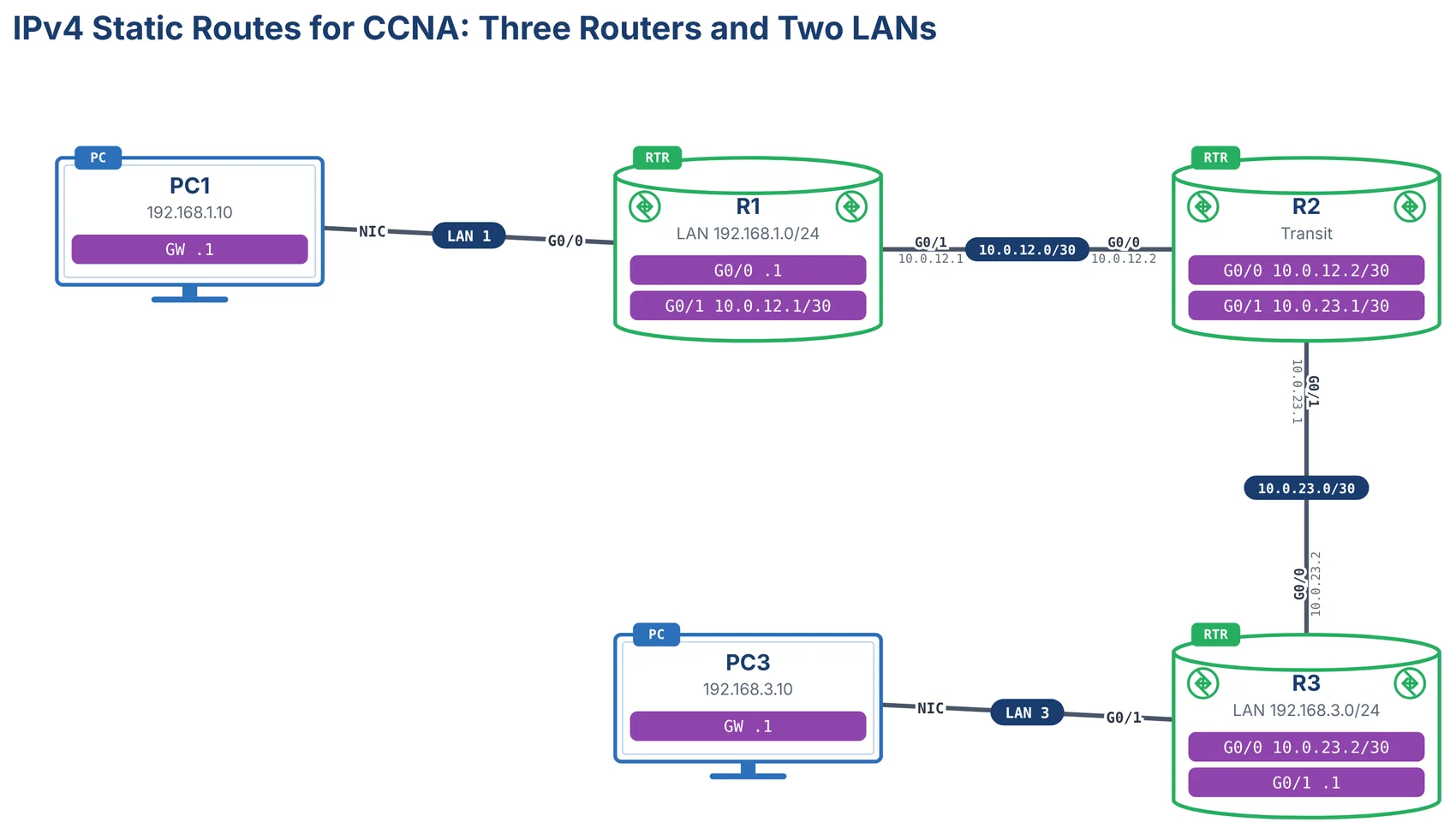
Edit this template Download .json
Learning objectives
- Write static routes with a next-hop address.
- Read the routing table and interpret the C, L and S codes.
- Verify end-to-end connectivity and troubleshoot missing routes.
Devices and addressing
| Device | Type | Details |
|---|---|---|
| PC1 | PC / user | 192.168.1.10 GW .1 |
| R1 | Router | LAN 192.168.1.0/24 G0/0 .1 G0/1 10.0.12.1/30 |
| R2 | Router | Transit G0/0 10.0.12.2/30 G0/1 10.0.23.1/30 |
| R3 | Router | LAN 192.168.3.0/24 G0/0 10.0.23.2/30 G0/1 .1 |
| PC3 | PC / user | 192.168.3.10 GW .1 |
Reference configuration (Cisco IOS)
R1
ip route 192.168.3.0 255.255.255.0 10.0.12.2
ip route 10.0.23.0 255.255.255.252 10.0.12.2
R2
ip route 192.168.1.0 255.255.255.0 10.0.12.1
ip route 192.168.3.0 255.255.255.0 10.0.23.2
R3
ip route 192.168.1.0 255.255.255.0 10.0.23.1
ip route 10.0.12.0 255.255.255.252 10.0.23.1
Verification commands
show ip routeshow ip route staticping 192.168.3.10traceroute 192.168.3.10
CCNA exam tips
A static route needs its counterpart in the return direction: without a return route the ping fails even if the forward path works.
The administrative distance of a static route is 1.
How to use this template
Press “Edit this template”: the editor opens with the topology loaded and ready to change (undo with Ctrl+Z). You can also copy the JSON and paste it into the editor with File ▸ Import JSON…. Then add devices, change IPs and export to PDF, PNG or SVG.
To practice, rebuild the topology in Cisco Packet Tracer, GNS3 or Cisco Modeling Labs and paste the reference configuration on each device. Addresses and names are examples: change them to create your own variants.
JSON template for the editor
This is the full diagram in JSON format. Paste it into the editor (File ▸ Import JSON…) or press the edit button to load it automatically.
Frequently asked questions
When should I use static routes?
In small networks, single-link (stub) sites and default routes; they do not scale well in large networks.
What does code S mean in the table?
That the route was configured statically.