
Port Security for CCNA: Limit MAC Addresses and Violation Modes
Port security limits which MAC addresses can use an access port and what to do on a violation. It protects against unauthorized devices and MAC table flooding attacks. It is typical layer 2 security in the CCNA.
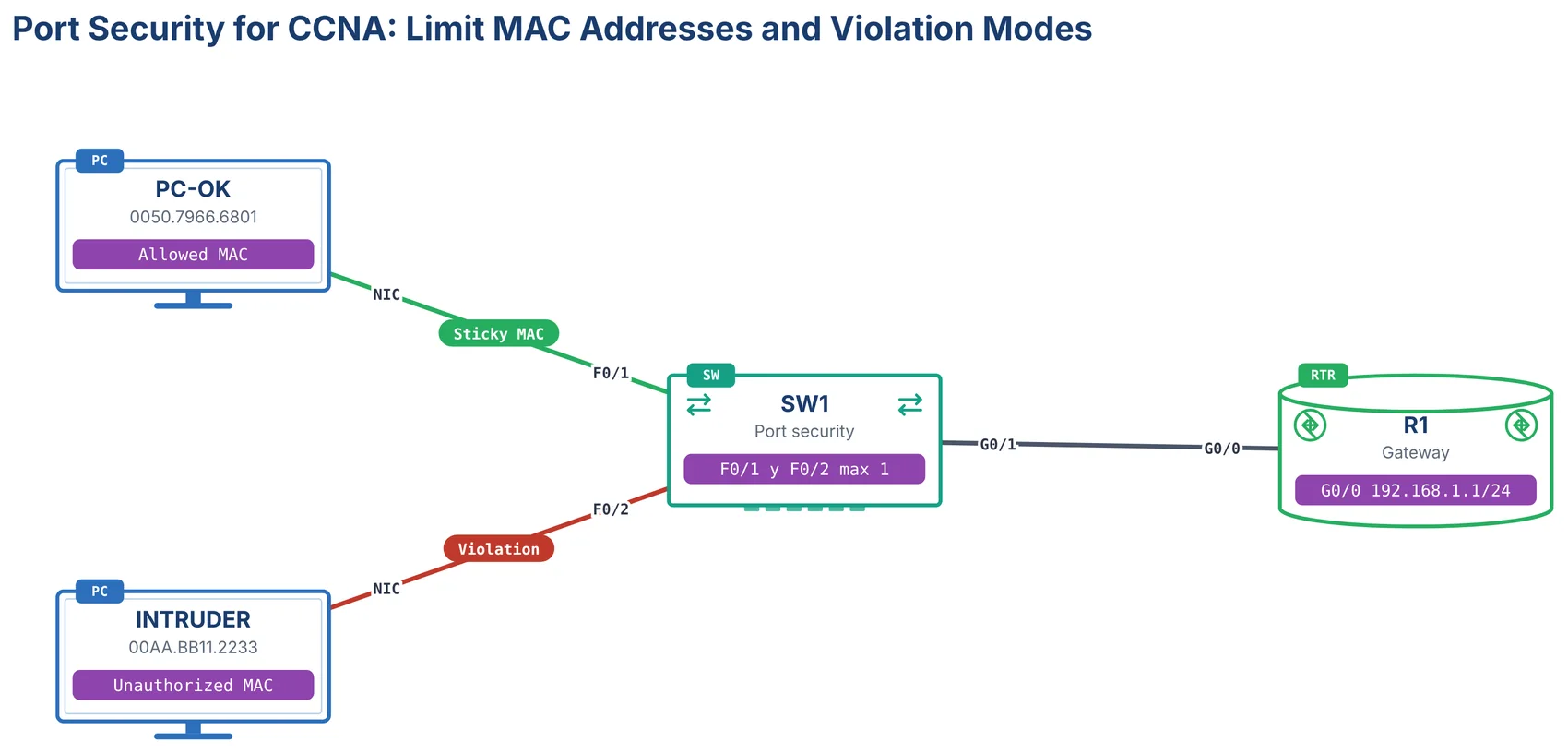
Edit this template Download .json
Learning objectives
- Enable port security with a maximum of MACs and sticky learning.
- Compare the shutdown, restrict and protect violation modes.
- Recover a port in err-disabled state.
Devices and addressing
| Device | Type | Details |
|---|---|---|
| PC-OK | PC / user | 0050.7966.6801 Allowed MAC |
| INTRUDER | PC / user | 00AA.BB11.2233 Unauthorized MAC |
| SW1 | Switch | Port security F0/1 y F0/2 max 1 |
| R1 | Router | Gateway G0/0 192.168.1.1/24 |
Reference configuration (Cisco IOS)
SW1
interface range f0/1 - 2
 switchport mode access
 switchport port-security
 switchport port-security maximum 1
 switchport port-security mac-address sticky
 switchport port-security violation shutdown
! Recuperar el puerto
interface f0/2
 shutdown
 no shutdown
Verification commands
show port-securityshow port-security interface f0/2show interfaces status err-disabledshow mac address-table secure
CCNA exam tips
It only works on static access or trunk ports, not on dynamic ports.
By default the violation mode is shutdown: the port goes err-disabled.
How to use this template
Press “Edit this template”: the editor opens with the topology loaded and ready to change (undo with Ctrl+Z). You can also copy the JSON and paste it into the editor with File ▸ Import JSON…. Then add devices, change IPs and export to PDF, PNG or SVG.
To practice, rebuild the topology in Cisco Packet Tracer, GNS3 or Cisco Modeling Labs and paste the reference configuration on each device. Addresses and names are examples: change them to create your own variants.
JSON template for the editor
This is the full diagram in JSON format. Paste it into the editor (File ▸ Import JSON…) or press the edit button to load it automatically.
Frequently asked questions
What does restrict mode do?
It drops illegal frames and logs the violation but keeps the port up.
How do I recover an err-disabled port?
With shutdown and no shutdown on the interface, or with errdisable recovery.