
Extended ACL for CCNA: Filter by Protocol, Source, Destination and Port
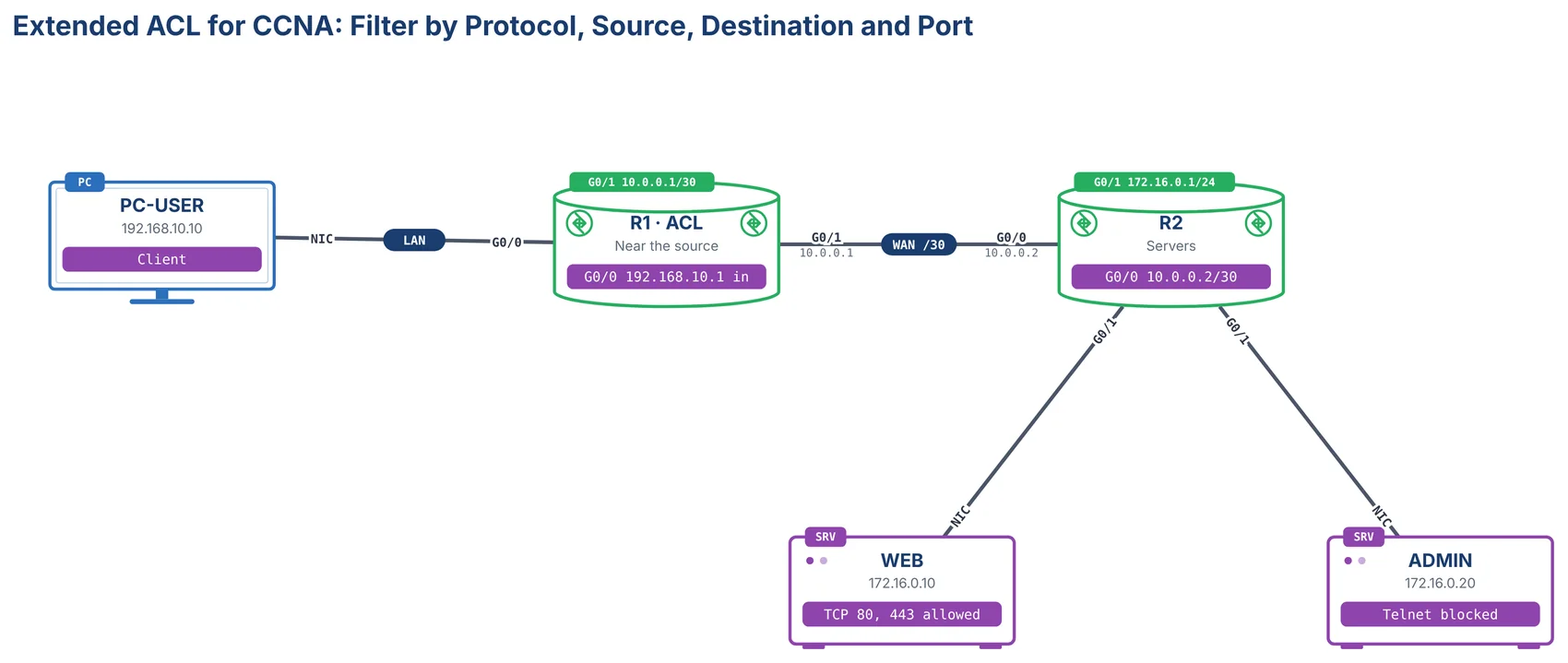
An extended ACL filters by protocol, source IP, destination IP and ports. It is much more precise than a standard one and is placed near the source to drop traffic as early as possible. It is a core piece of the security domain.
Edit this template Download .json
Learning objectives
- Write permit and deny rules by protocol and port.
- Apply the placement rule: extended near the source.
- Order rules from most specific to most general.
Devices and addressing
| Device | Type | Details |
|---|---|---|
| PC-USER | PC / user | 192.168.10.10 Client |
| R1 · ACL | G0/1 10.0.0.1/30 | Near the source G0/0 192.168.10.1 in |
| R2 | G0/1 172.16.0.1/24 | Servers G0/0 10.0.0.2/30 |
| WEB | Server | 172.16.0.10 TCP 80, 443 allowed |
| ADMIN | Server | 172.16.0.20 Telnet blocked |
Reference configuration (Cisco IOS)
R1
ip access-list extended WEB-ONLY
 permit tcp 192.168.10.0 0.0.0.255 host 172.16.0.10 eq 80
 permit tcp 192.168.10.0 0.0.0.255 host 172.16.0.10 eq 443
 deny   tcp 192.168.10.0 0.0.0.255 host 172.16.0.20 eq 23
 permit icmp 192.168.10.0 0.0.0.255 any
 deny ip any any log
interface g0/0
 ip access-group WEB-ONLY in
Verification commands
show access-listsshow ip interface g0/0telnet 172.16.0.20 (debe fallar)show logging | include list
CCNA exam tips
ACLs are evaluated top-down and stop at the first match.
For ICMP: permit icmp any any echo-reply allows ping replies.
How to use this template
Press “Edit this template”: the editor opens with the topology loaded and ready to change (undo with Ctrl+Z). You can also copy the JSON and paste it into the editor with File ▸ Import JSON…. Then add devices, change IPs and export to PDF, PNG or SVG.
To practice, rebuild the topology in Cisco Packet Tracer, GNS3 or Cisco Modeling Labs and paste the reference configuration on each device. Addresses and names are examples: change them to create your own variants.
JSON template for the editor
This is the full diagram in JSON format. Paste it into the editor (File ▸ Import JSON…) or press the edit button to load it automatically.
Frequently asked questions
What is the difference between standard and extended ACLs?
Standard filters only by source IP; extended adds destination, protocol and ports.
Where is an extended ACL placed?
Near the source of the traffic to be blocked.