
Site-to-Site IPsec VPN for CCNA: Tunnel Between Two Sites
A site-to-site VPN connects two private networks across the Internet with an encrypted tunnel. IPsec provides confidentiality, integrity and authentication. The CCNA expects you to know the difference between site-to-site and remote access and the IPsec components.
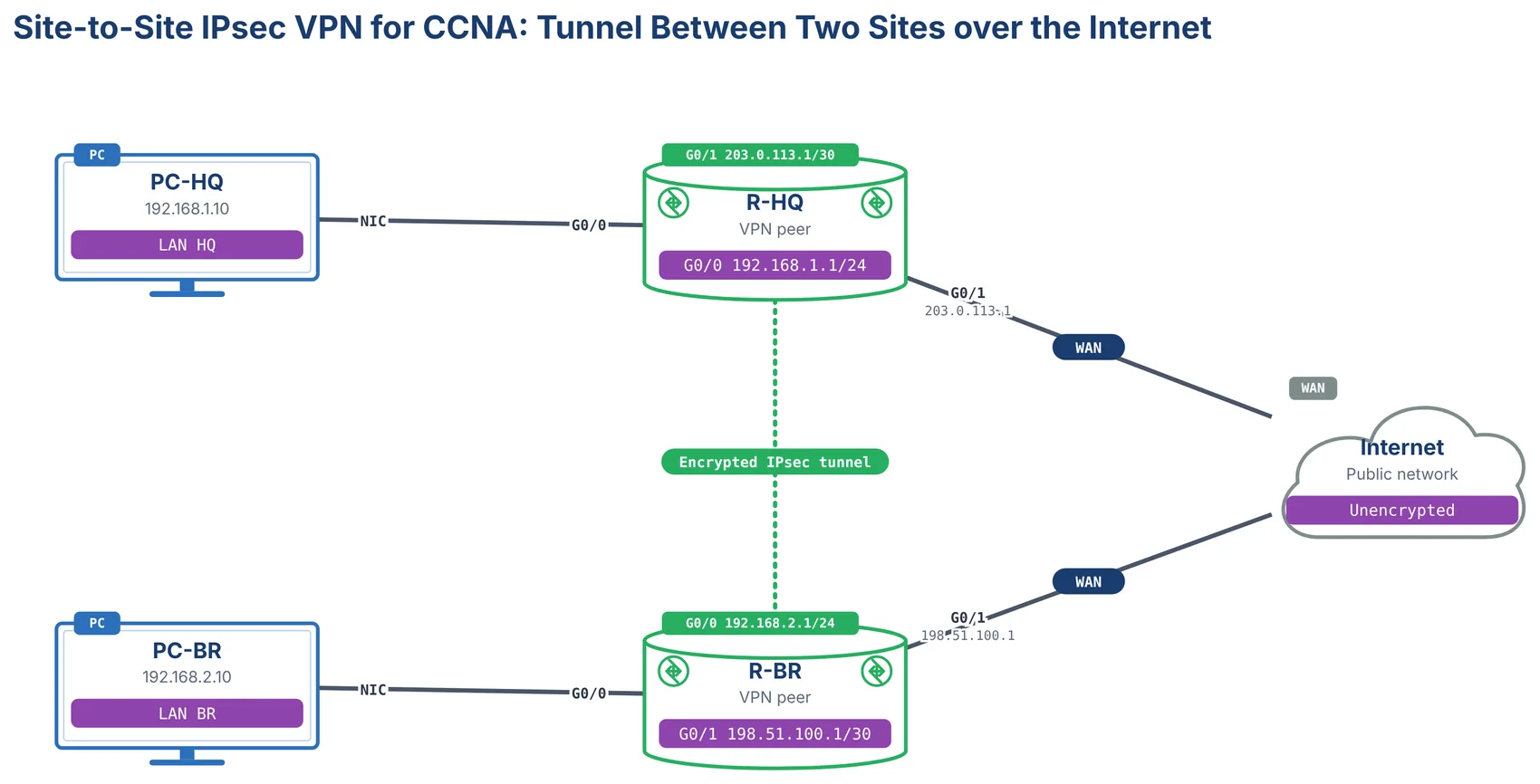
Edit this template Download .json
Learning objectives
- Identify interesting traffic and the crypto ACL.
- Configure phase 1 (IKE) and phase 2 (IPsec) and the crypto map.
- Verify the tunnel is up with show crypto.
Devices and addressing
| Device | Type | Details |
|---|---|---|
| PC-HQ | PC / user | 192.168.1.10 LAN HQ |
| R-HQ | G0/1 203.0.113.1/30 | VPN peer G0/0 192.168.1.1/24 |
| Internet | WAN | Public network Unencrypted |
| R-BR | G0/0 192.168.2.1/24 | VPN peer G0/1 198.51.100.1/30 |
| PC-BR | PC / user | 192.168.2.10 LAN BR |
Reference configuration (Cisco IOS)
R-HQ
crypto isakmp policy 10
 encryption aes 256
 hash sha256
 authentication pre-share
 group 14
crypto isakmp key Vpn-Clave-2026 address 198.51.100.1
crypto ipsec transform-set TS esp-aes 256 esp-sha256-hmac
access-list 110 permit ip 192.168.1.0 0.0.0.255 192.168.2.0 0.0.0.255
crypto map CMAP 10 ipsec-isakmp
 set peer 198.51.100.1
 set transform-set TS
 match address 110
interface g0/1
 crypto map CMAP
R-BR
crypto isakmp policy 10
 encryption aes 256
 hash sha256
 authentication pre-share
 group 14
crypto isakmp key Vpn-Clave-2026 address 203.0.113.1
crypto ipsec transform-set TS esp-aes 256 esp-sha256-hmac
access-list 110 permit ip 192.168.2.0 0.0.0.255 192.168.1.0 0.0.0.255
crypto map CMAP 10 ipsec-isakmp
 set peer 203.0.113.1
 set transform-set TS
 match address 110
interface g0/1
 crypto map CMAP
Verification commands
show crypto isakmp sashow crypto ipsec saping 192.168.2.10 source 192.168.1.1show crypto map
CCNA exam tips
Phase 1 negotiates the management channel (ISAKMP/IKE); phase 2 negotiates the data tunnel (IPsec SA).
Each end's ACL must be a mirror of the other's.
How to use this template
Press “Edit this template”: the editor opens with the topology loaded and ready to change (undo with Ctrl+Z). You can also copy the JSON and paste it into the editor with File ▸ Import JSON…. Then add devices, change IPs and export to PDF, PNG or SVG.
To practice, rebuild the topology in Cisco Packet Tracer, GNS3 or Cisco Modeling Labs and paste the reference configuration on each device. Addresses and names are examples: change them to create your own variants.
JSON template for the editor
This is the full diagram in JSON format. Paste it into the editor (File ▸ Import JSON…) or press the edit button to load it automatically.
Frequently asked questions
What is the difference between site-to-site and remote-access VPN?
Site-to-site joins two networks using routers or firewalls; remote access connects an individual user with a client.
What do AH and ESP protect?
ESP provides encryption and integrity; AH only integrity and authentication.