
Standard ACL for CCNA: Filter by Source, Place Near the Destination
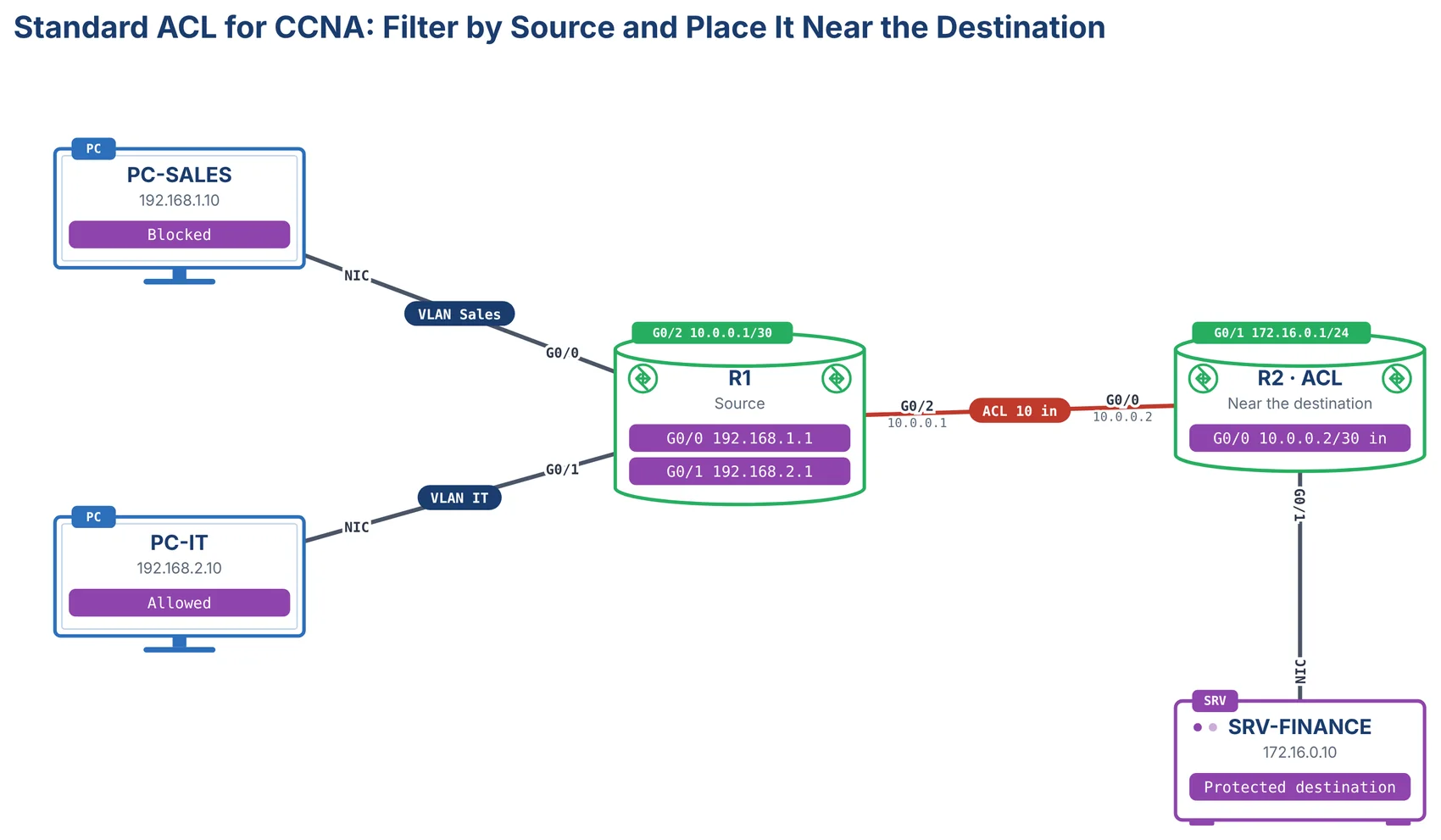
A standard ACL filters only by source IP address. It is placed as close as possible to the destination to avoid blocking more traffic than needed. It is the first step to understand packet filtering and access control lists in the CCNA.
Edit this template Download .json
Learning objectives
- Write a standard ACL with a wildcard and apply it with ip access-group.
- Apply the placement rule: standard near the destination.
- Interpret match counters with show access-lists.
Devices and addressing
| Device | Type | Details |
|---|---|---|
| PC-SALES | PC / user | 192.168.1.10 Blocked |
| PC-IT | PC / user | 192.168.2.10 Allowed |
| R1 | G0/2 10.0.0.1/30 | Source G0/0 192.168.1.1 G0/1 192.168.2.1 |
| R2 · ACL | G0/1 172.16.0.1/24 | Near the destination G0/0 10.0.0.2/30 in |
| SRV-FINANCE | Server | 172.16.0.10 Protected destination |
Reference configuration (Cisco IOS)
R2
access-list 10 remark Bloquear Ventas hacia Finanzas
access-list 10 deny 192.168.1.0 0.0.0.255
access-list 10 permit any
interface g0/0
 ip access-group 10 in
! Equivalente con nombre
ip access-list standard FILTRO-VENTAS
 deny 192.168.1.0 0.0.0.255
 permit any
Verification commands
show access-listsshow ip interface g0/0 | include access listping 172.16.0.10 (desde PC-VENTAS: falla)ping 172.16.0.10 (desde PC-TI: responde)
CCNA exam tips
Every ACL ends with an implicit deny: without at least one permit it blocks everything.
Wildcard = inverse of the mask: 255.255.255.0 → 0.0.0.255.
How to use this template
Press “Edit this template”: the editor opens with the topology loaded and ready to change (undo with Ctrl+Z). You can also copy the JSON and paste it into the editor with File ▸ Import JSON…. Then add devices, change IPs and export to PDF, PNG or SVG.
To practice, rebuild the topology in Cisco Packet Tracer, GNS3 or Cisco Modeling Labs and paste the reference configuration on each device. Addresses and names are examples: change them to create your own variants.
JSON template for the editor
This is the full diagram in JSON format. Paste it into the editor (File ▸ Import JSON…) or press the edit button to load it automatically.
Frequently asked questions
Where is a standard ACL placed?
Near the destination, because it only sees the source IP.
What is the implicit deny?
An invisible rule at the end of every ACL that drops whatever matched no earlier line.