
IPv6 Static Routes for CCNA: Global and Link-Local Next Hop
Static routing in IPv6 works like IPv4 but with 128-bit prefixes and link-local addresses. You must enable ipv6 unicast-routing and, when using a link-local next hop, also give the exit interface.
Edit this template Download .json
Learning objectives
- Configure IPv6 static routes with a global unicast next hop.
- Use a link-local address as the next hop together with the interface.
- Create a ::/0 default route and verify the table.
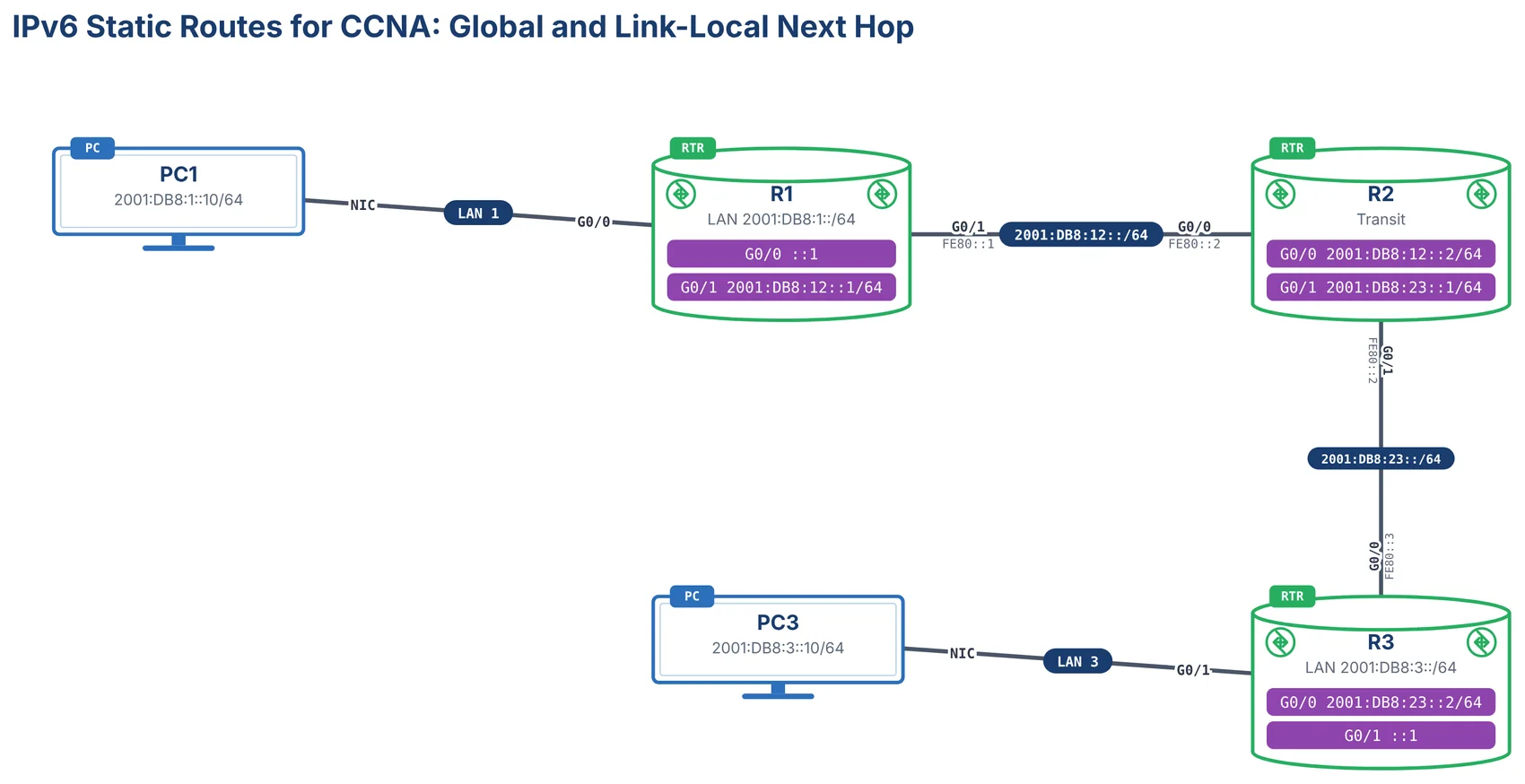
Devices and addressing
| Device | Type | Details |
|---|---|---|
| PC1 | PC / user | 2001:DB8:1::10/64 |
| R1 | Router | LAN 2001:DB8:1::/64 G0/0 ::1 G0/1 2001:DB8:12::1/64 |
| R2 | Router | Transit G0/0 2001:DB8:12::2/64 G0/1 2001:DB8:23::1/64 |
| R3 | Router | LAN 2001:DB8:3::/64 G0/0 2001:DB8:23::2/64 G0/1 ::1 |
| PC3 | PC / user | 2001:DB8:3::10/64 |
Reference configuration (Cisco IOS)
R1
ipv6 unicast-routing
ipv6 route 2001:db8:3::/64 2001:db8:12::2
ipv6 route 2001:db8:23::/64 2001:db8:12::2
R3
ipv6 unicast-routing
ipv6 route ::/0 g0/0 fe80::2
Verification commands
show ipv6 routeshow ipv6 route staticping 2001:db8:3::10traceroute 2001:db8:3::10
CCNA exam tips
A link-local next hop requires an interface: ipv6 route PREFIX interface FE80::x.
The IPv6 default route is ::/0.
How to use this template
Press “Edit this template”: the editor opens with the topology loaded and ready to change (undo with Ctrl+Z). You can also copy the JSON and paste it into the editor with File ▸ Import JSON…. Then add devices, change IPs and export to PDF, PNG or SVG.
To practice, rebuild the topology in Cisco Packet Tracer, GNS3 or Cisco Modeling Labs and paste the reference configuration on each device. Addresses and names are examples: change them to create your own variants.
JSON template for the editor
This is the full diagram in JSON format. Paste it into the editor (File ▸ Import JSON…) or press the edit button to load it automatically.
Frequently asked questions
How do you write the default route in IPv6?
ipv6 route ::/0 next-hop.
Why use link-local as a next hop?
Because it is stable on the link and does not change if the global prefix is renumbered.