
Router-on-a-Stick for CCNA: Inter-VLAN Routing with Subinterfaces
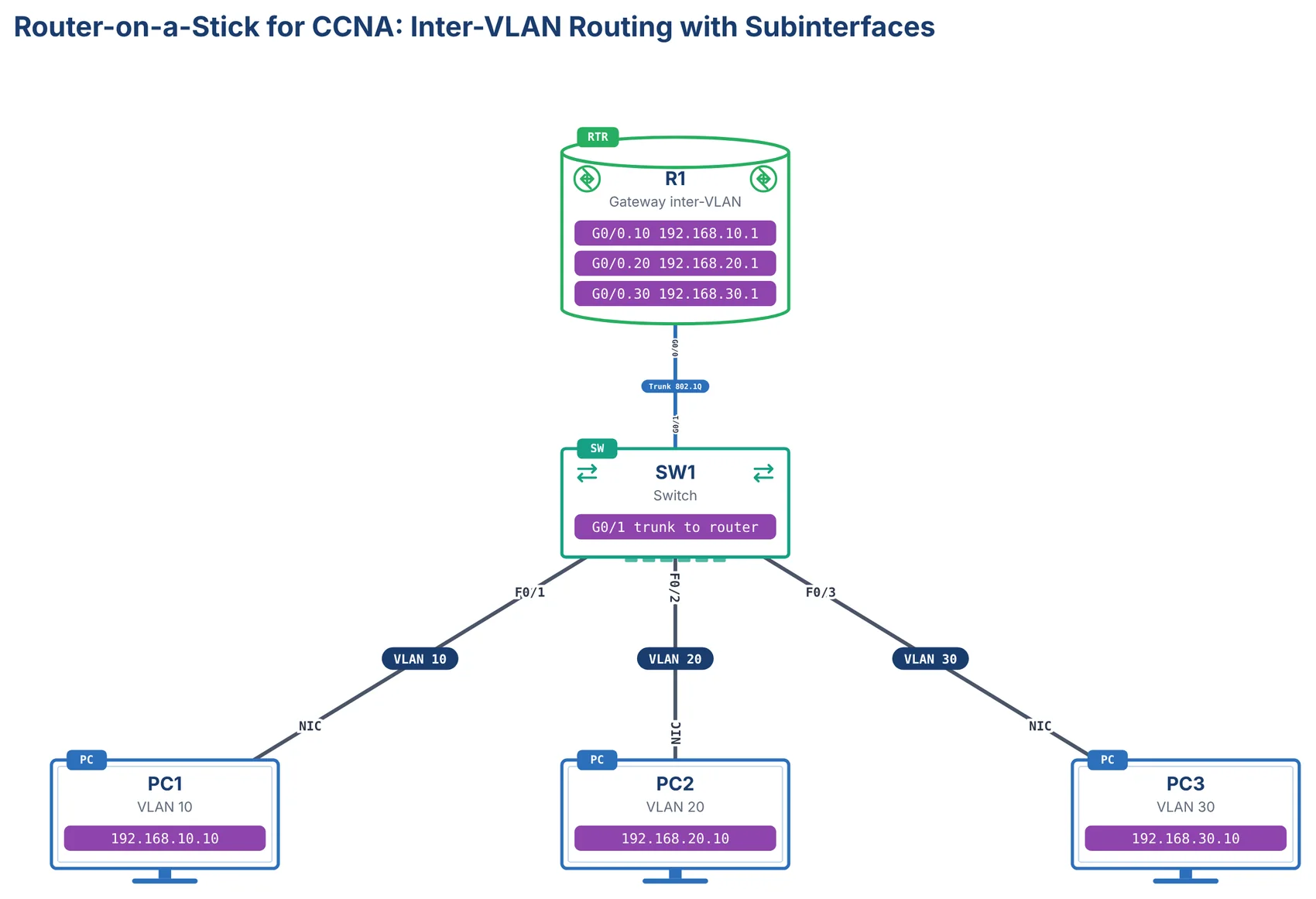
With router-on-a-stick a single trunk joins the switch and the router, and the router has one subinterface per VLAN acting as the gateway. It is the classic way to route between VLANs in a small network and always shows up in the CCNA.
Edit this template Download .json
Learning objectives
- Create subinterfaces with encapsulation dot1q for each VLAN.
- Configure the switch port as a trunk toward the router.
- Verify that PCs in different VLANs communicate through the router.
Devices and addressing
| Device | Type | Details |
|---|---|---|
| R1 | Router | Gateway inter-VLAN G0/0.10 192.168.10.1 G0/0.20 192.168.20.1 G0/0.30 192.168.30.1 |
| SW1 | Switch | Switch G0/1 trunk to router |
| PC1 | PC / user | VLAN 10 192.168.10.10 |
| PC2 | PC / user | VLAN 20 192.168.20.10 |
| PC3 | PC / user | VLAN 30 192.168.30.10 |
Reference configuration (Cisco IOS)
R1
interface g0/0
 no shutdown
interface g0/0.10
 encapsulation dot1q 10
 ip address 192.168.10.1 255.255.255.0
interface g0/0.20
 encapsulation dot1q 20
 ip address 192.168.20.1 255.255.255.0
interface g0/0.30
 encapsulation dot1q 30
 ip address 192.168.30.1 255.255.255.0
SW1
vlan 10
vlan 20
vlan 30
interface g0/1
 switchport mode trunk
interface f0/1
 switchport mode access
 switchport access vlan 10
interface f0/2
 switchport mode access
 switchport access vlan 20
interface f0/3
 switchport mode access
 switchport access vlan 30
Verification commands
show ip interface briefshow interfaces trunkshow ip routeping 192.168.20.10
CCNA exam tips
The physical interface carries no IP; each subinterface (g0/0.10) carries the gateway IP of its VLAN.
The subinterface number is just a label: what counts is the encapsulation dot1q <VLAN> command.
How to use this template
Press “Edit this template”: the editor opens with the topology loaded and ready to change (undo with Ctrl+Z). You can also copy the JSON and paste it into the editor with File ▸ Import JSON…. Then add devices, change IPs and export to PDF, PNG or SVG.
To practice, rebuild the topology in Cisco Packet Tracer, GNS3 or Cisco Modeling Labs and paste the reference configuration on each device. Addresses and names are examples: change them to create your own variants.
JSON template for the editor
This is the full diagram in JSON format. Paste it into the editor (File ▸ Import JSON…) or press the edit button to load it automatically.
Frequently asked questions
What is the drawback of router-on-a-stick?
All inter-VLAN traffic shares one link and the router can become a bottleneck.
What is the alternative?
A layer 3 switch with SVI interfaces.